
Why Switch?
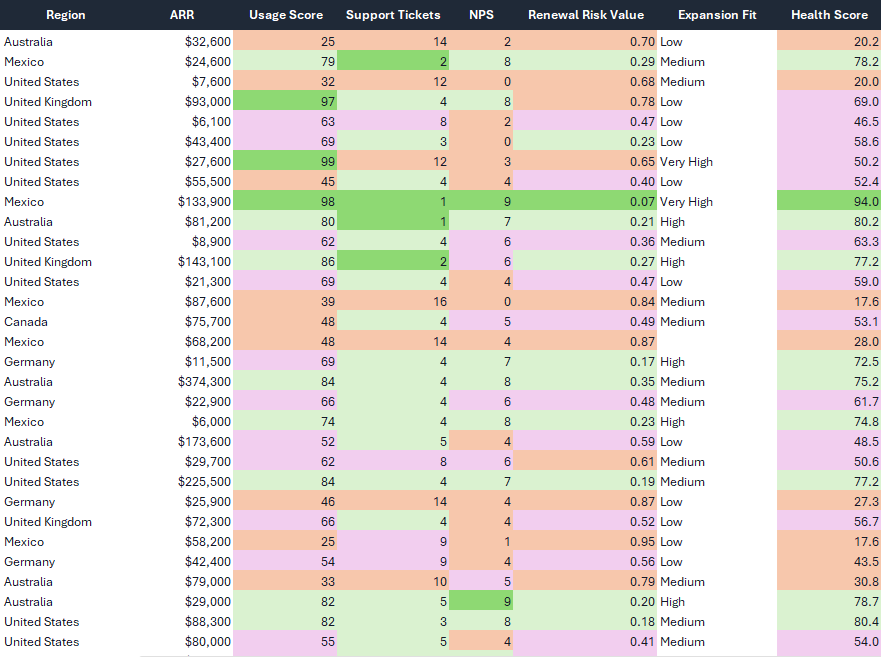
From this...

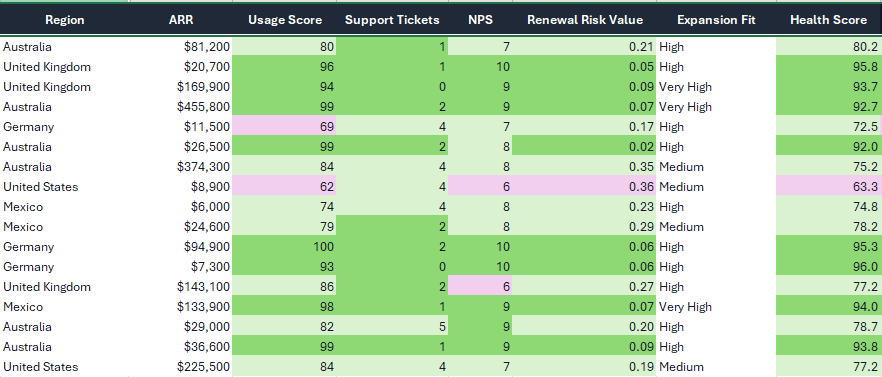
To this!
Old Way
✕
Manual scanning to find critical data trends
✕
Fragile, inconsistent conditional formatting
✕
Subjective judgment varied by sheet and user
✕
Wasted hours performing visual audits
✕
Hidden patterns frequently stay hidden
Judgement Bands
✓
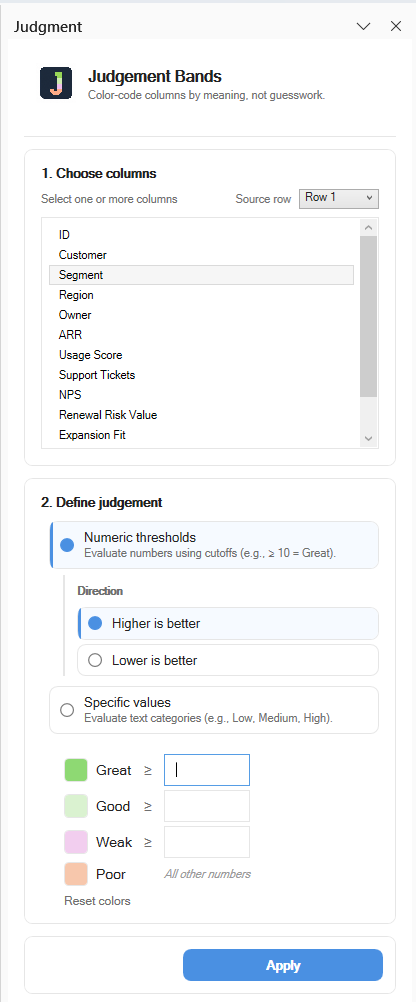
Instant visual applying Great / Good / Weak / Poor logic
✓
Apply standardized logic to one or multiple columns
✓
Reusable, objective thresholds for entire teams
✓
Surface standout rows and identify poor performers instantly
✓
Filter results to show only the insight that matters
Applications
Where Judgment Matters Most
Business Analysis
KPI Reviews
Risk scoring
Inventory Control
Alerts
Sales Metrics


Frequently Asked Questions
01 WHAT IS JUDGEMENT BANDS?
+
Judgement Bands is a specialized Microsoft Excel add-in designed for professionals who need to see trends and standout records instantly. It visually applies custom logic to your data columns, transforming flat spreadsheets into clear, color-coded insights.
02 DOES IT WORK INSIDE MICROSOFT EXCEL?
+
Yes. It is a native desktop add-in built specifically for Microsoft Excel on Windows. Once installed, it lives inside your spreadsheet environment as a dedicated task pane, allowing you to apply judgment logic without leaving your workbook.
03 HOW DOES THE 15-DAY FREE TRIAL WORK?
+
The trial gives you 15 days of full, unrestricted access to all features. No credit card is required to start. Simply download the add-in and begin visualizing your data. We want you to see the impact before you commit.
04 WHAT HAPPENS AFTER THE TRIAL ENDS?
+
Once your trial expires, the add-in features will be locked. To continue using Judgement Bands, you can purchase a lifetime license and simply enter your license key within the app settings to unlock it permanently.
05 IS THIS A SUBSCRIPTION?
-
No. Judgement Bands is a one-time purchase of $149 for a lifetime license. You pay once and own it forever. No monthly fees, no hidden costs, and no recurring billing.
06 HOW DO I UNLOCK THE APP AFTER PURCHASE?
+
Immediately after purchase, your license key will be sent to your email. Open Microsoft Excel, click on the Judgement Bands icon in the ribbon, and paste your key into the activation tab. Your add-in will be unlocked instantly.
Powerful Features
Polished tools designed to surface what matters in your spreadsheets instantly.
01
Quick Definition
Define your custom judgment logic in seconds with a intuitive task pane interface.
04
Reuseable Logic
Save your best judgment bands and apply them to new spreadsheets in a single click.
02
Multi-Column Logic
Apply complex bands to one or multiple columns simultaneously without breaking formulas.
05
Logic-Based Hiding
Automatically hide poor and weak rows to focus exclusively on your high-performing data points.
03
Threshold Control
Use precise numeric thresholds and specific categorical values to trigger judgment states.
06
Instant Heatmaps
Reveal trends and standouts instantly, turning flat rows into actionable visual insight.